Showing posts with label How to. Show all posts

Friday, March 7, 2014

HOW TO: Gladiator Fight

The NotTooHot Ides of March Celebration is March 15. Riddle will have a training session Sunday and Wednesday for interested Gladiators.


GLADIATOR FIGHTING

There are two Gladiator Events. The first is a single elimination tournament. Gladiators fight one against one in the best of three fights. Each winner advances to the next round and eventually the finals. The second Event is the Gladiator Melee. All Gladiators fight at the same time with the last living Gladiator the winner.

GLADIATOR HEALTH AND DEATH

All Gladiators must wear the SPD-J Health 1.61 that is given to you. When you first wear the Health Meter, it displays your name and 100%, which is your initial health. While you fight, you may be injured. Injuries cause your health meter percentage to drop. When it is 0% you are D E A D ... dead. When you are dead, you automatically fall on the floor.


GLADIATOR WEAPONS

You have two types of weapons: Spears for throwing  and swords for close combat. You may also wear a shield and helmet but they offer no additional protection.

To use the spear go to mouselook, aim at your opponent, and press the left mouse button. This throws the spear at your opponent. You can only throw a spear once every 15 seconds.

To activate the sword, wear the Sword Sheath and wear the Sword. The Sword Sheath goes on your hip. Click on the sheathed sword until it draws. You may use your own sword as long as it does not have poofers or displaced animations in it. .

To use the sword go into mouselook and PRESS and HOLD the left mouse button. Now tap your keyboard arrow keys (left, right, forward or backward). This creates 4 different slashing and thrusting moves with the sword. Be close to your opponent to hit.

You can use both the spear and sword at the same time. In mouselook a click on the left mouse button launches the spear while holding it down and using the arrow keys activates the unsheathed sword.

You can move by using the arrow keys without pressing the left mouse button.

DAMAGE

Damage is what a successful hit does to your opponent's Health Meter. The spear does 50% damage, a sword hit does 5, 10 or 15% damage depending on which arrow key you use to slash

HOW TO PARTICIPATE IN THE TOURNAMENT (March 15 at 1 pm)

1. Sign up for the tournament by clicking on the scoreboard. This places you in one-on-one fights against your first opponent.

2. Wear the SPD-J Health 1.61 that is given to you and your spear and sword.

3. Gladiators sit in the audience area on purple cushions until called by the Battle Coordinator (Riddle), for example, "next up are Nottoo on the red side and Riddle on the blue side" Go to the marked position and step off the side so you are on the fighting level behind the gate with your weapons ready and in mouselook.

4 The gates will open on the command of the Battle Coordinator.

5 You now fight your opponent until one is killed (0% on the Health Meter). If both Gladiators are killed at the same time, it is a TIE and will be re-fought. After the first round a second and possibly a third round will be fought until one Gladiator wins two times. The winning Gladiator advances and the losing Gladiator is eliminated.

HOW TO PARTICIPATE IN THE GLADIATOR MELEE (March 15 at 3 pm)

All Gladiators assemble in the fighting area anywhere you wish as long as you are standing on the floor. At the Battle Commanders Starting Call, the Battle begins. The last living Gladiator is the winner. If the last two Gladiators die at the same time, too bad, more lion food.

xxx
Nottoo

Friday, February 7, 2014

HOW TO: Use the Curtained Area XPOSE

Continuing with the theme of telling you how everything works at NotTooHot, the Curtained Area of the Club contains an XPOSE. Here is the Curtained Area with seats:


If you go to the area and look up, you will see a red cylinder. This is the Curtained Area XPOSE. Click on it and you get a menu. 


The menu is arranged in groups of 12 items. Select one of the Items buttons for a choice of an item to rezz. For example, here is the contents of Items 1.


I selected Dance Cage and immediately a Dance Cage was rezzed. I sat on the Cage and started to dance.


Later, I decided I wanted to do something else and again touched the XPOSE to rezz a different item. This time I chose the Shower.


I have tried to make each item with animations included so you can have fun.

xxx
Nottoo

Monday, February 3, 2014

HOW TO: Use the Balcony Furniture

I never expected to write a post about how to use furniture ... hahahaha ... well, in SL you should expect anything.

Riddle and I were working on the party area for the upcoming Valentines Day Party and we decided to look at some furniture that would be nice for couples to get cozy. Thanks to SL Marketplace we soon had a nice sofa and chairs that fit perfectly. They are copy-mod so can be put in an XPOSE rezzer to be used when needed.

Riddle and I tried them out. Here is a pic of our sofa test ...


There are some very well done individual and couples anims in the sofa and individual anims in the chairs. They don't extend into the 'having sex' territory so to do that you will have to find a different spot.

Well once we saw the anims, we thought that it would also be a good idea to use the space on the Club balcony for a sitting area. We have never used the area on the right at the top of the stairs and made a little setting.


So, now you can be at your Club and sit in a relatively private area alone, with a friend or with your honey. One of the nice things about it is you can get a book or a glass of wine from the sofa or chairs, sit and listen to the music apart from the crowd below.

After Riddle went to bed, deto (detocqueville) and lala showed up and it was just in time. There is a three-way sitting arrangement in the sofa, so we tried it out. Hahahaha ... very cute.

Ready to chill? Now you can.

xxx
Nottoo

Sunday, February 2, 2014

HOW TO: Wine Cellar Party Room

Riddle and I made a wine cellar in the Club's Party Area. Here is a picture of it ...


You can get to the Wine Cellar by going down the steps from the entry gate and turning left or going to the ocean side of the Club and going down the steps. 

We use an XPOSE located on the ceiling to store and rezz the wine cellar. 

The wine cellar has lots of seats, bar stands, an outside area for stomping grapes and a small stage

xxx
Nottoo.

Wednesday, January 29, 2014

HOW TO: Get on the Bar for Dancing

Not everyone in SL is an experienced bar dancer. Sometimes, I forget that seven years of bar dancing experience gives me the complete know-how of getting myself on the NotTooHot bar to show my dancing stuff. Last Sunday, I realized that in our Club we have some members who are not so experienced ... I mean ten tries to get on the bar. I won't mention names. Finally, I made some temporary steps to solve the problem.

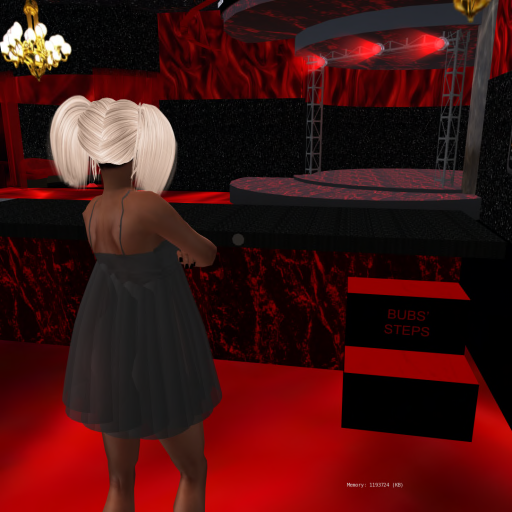
Yesterday, I made some permanent steps located on the back side of the bar. This should solve the problem of getting on the bar. Here is a picture of them if you are in need.


Hahahahaha!

xxx,
Nottoo

Tuesday, December 10, 2013

HOW TO: Dance Balls at NotTooHot


Although many people dance with a HUD, this note covers only the use of the Club's Dance Balls. If you look above the bar you will see a set of large red and blue balls.


The smaller multicolored ball is the Couples INTAN (238 dances) while the large red ball is for individual female dances (761 dances) and the large blue ball is for male dances (353 dances).

My goal is to have the best dance balls in SL.

Although everyone knows how to use the INTAN, with so many couples dance choices available understanding a bit more about the capabilities of the INTAN system will make your dancing a lot more fun. The key to the INTAN is the INTAN HUD. You can get one from me or by clicking on the multicolored ball after you hop on a red or blue INTAN pose ball and selecting the Tools & Help button followed by the Get HUD button.


Wear the HUD. It defaults to the upper right of your screen.


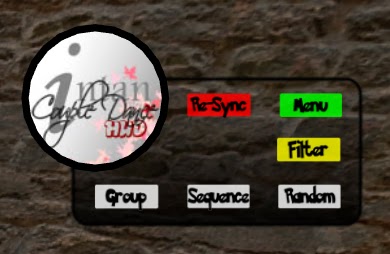
When you wear the HUD, you get easy access to the Re-Sync button at any time. Without the HUD the Re-Sync button is only available from the first page of the menu and with 29 menu pages a resync could lead to carpal tunnel syndrome from all the clicking.

The INTAN also lets you access the dances that are the type you want using the INTAN Filter feature. I have placed all the couples dances into one or more categories. Click on the yellow Filter button to see the list of categories.


Select the style of dance you want, such as Latin followed by Set Group. This sets the INTAN HUD only to see Latin dances. When you next click on the green Menu button all you see are the Latin dances.


When you are ready to switch to another style of dancing, click again on the yellow Filter button and click STOP. After that repeat the process to select the next style.

Here is an example:

How to Tango:

1. Click on the INTAN Dance Ball to rezz the INTAN pose balls
2. Both sit on the appropriate pose ball
3. Wear the INTAN HUD, which I can give you. It goes in the upper right of your screen
4. On the HUD click the yellow Filter Button to bring up a blue menu
5. Choose Tango then Set Group
6. Close the blue menu
7. Click the green menu sign and now you see all the tango dances


Unfortunately, the individual dance balls for female and male dances do not have any kind of filtering. As a result you will get huge finger muscles from all the clicking you will do to go through the long list of dances arranged in alphabetical order.

Have fun dancing!

xxx
Nottoo

Sunday, December 8, 2013

HOW TO: Bar XPOSE

An XPOSE is a system that is used in many items in SL such as furniture including sofas, sex beds and lots of things that have one or more avatars being animated. The XPOSE system not only allows for the animation of avatars, it also allows precise rezzing of objects. At NotTooHot we use an XPOSE to manage the rezzing and de-rezzing of items associated with the bar.

The NotTooHot Bar XPOSE is located under the bar at the Club just below the DJ equipment.


Here is a photo from behind the bar. See the black square under the bar. That's the Bar XPOSE. When you move your cursor over the square, a small hand appears. Left click and you get a blue menu in the upper right (with Firestorm). Here is an example of the menu as of this writing.


The menu leads to different items that are stored in the rezzer. Clicking on a button rezzes that item on or near the bar. Usually clicking on a different item de-rezzes the currently rezzed item and replaces it with the clicked item. To remove everything that has been rezzed, just click on the 'STOP' button. Here is the empty bar, with Marv just hanging out.


Any member can rezz items to have fun. Please de-rezz the item when you are finished. If you want something specific added to the XPOSE, let me know.

I will identify items that are added to the Bar XPOSE and give more information about their use in separate notes.

xxx
Nottoo

Friday, December 6, 2013

HOW TO: Bar Stands

After installing the bar stools with the seats, Riddle said, "What about bar stands for the guys who like to lean and drink?" This led to the creation of the Bar Stands at the Club. This is how they work ...

Here I am near the Club bar trying to think like a guy. "Hmmm, I would love a glass of that delicious Quilmes beer, Argentina's favorite."


I could walk over to the bar and look sexy with my HUD, but most guys don't have HUDs. To help them we have placed small bar decorations on the edge of the bar that double as a way to stand at the bar.

Look again at the photo above. See that blue circle on the edge of the bar. When you move your cursor over the circle, you see a small hand and a chair. Just left click ... and ZOOOOM, there you are standing at the bar in a macho stand.


You also get a blue menu in the upper right side of your screen. At least I do since I use Firestorm as a viewer.


I put in eight stands as choices. Some face out from the bar and others in. Play with this and choose what fits your mood. There are also four more choices. You can sit on the bar and be uber-cool. You can die and remain on the floor waiting for your Oscar. You can be drunk. Or you can dance and never leave the side of the bar.

Once I made the Bar Stands for guys, I began to think, "Hey, girls like to stand at the bar sometimes too!" So, I made a separate circle in red for females. If you look again at the top photo, you will see it. 

The menu for the female Bar Stands gives different choices:


How the Bar Stands are Made

The stand prim is just a colored cylinder with a script for placing the avatar and playing an animation ([HeZ] Notecard driven multi-sit (quat) 1.06c), twelve animations, and a notecard identifying the x,y,z coordinates and rotation for each position. If you are interested in something like this, let me know.

xxx
Nottoo

HOW TO: Bar Seats

Here I am at the NotTooHot Club looking at a bar seat. 


Hmmm, yes I want to sit down. How do I do it?

Easy ...  I move my cursor over the seat and I see a little hand with a chair. One left click and I am seated.


Since I use Firestorm as my SL viewer, as soon as I sit I get a blue window in the upper right of my screen.


This menu allows me to choose any one of twelve sitting positions for my avatar. When making the bar seats, I used the innovative naming system sit1, sit2, etc. in identifying the sits. Unless I am wearing a dress, I like sit6.


You can choose your own favorite sitting position or switch around. 

If you want to remove the menu just click on the 'Ignore' button. To get the menu again, just click on the bar seat.

How the Bar Seats are Made

The bar seats are a one-prim torus colored red with the library version of linen texture. The pillow contents contain a seating script ([HeZ] Notecard driven multi-sit (quat) 1.06c), twelve sitting animations and a notecard identifying the x,y,z coordinates and rotation for each position. If you are interested in something like this, let me know and I can give you the details of how to do it.

xxx
Nottoo